
DedaIO app
The app for your boards find, monitor, test and update every DedaIO-16 on the network, from a PC or a tablet
One window for every board in the room: it finds them by itself, shows live what happens on each terminal and lets you test the wiring without starting the game. It manages the boards, not the room: the game is run by your room software.
See what it does Block-based games
- LAN auto discovery
- Live inputs and outputs
- OTA updates
- Web on tablets too
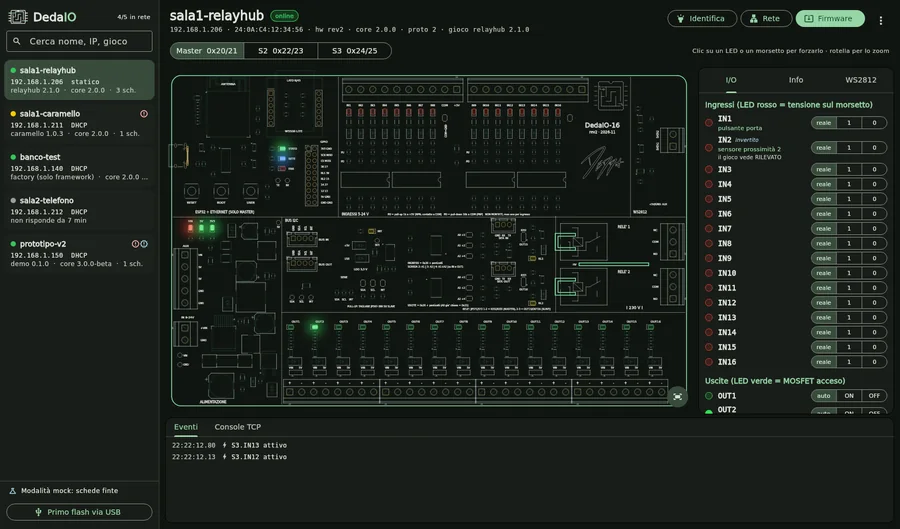
Automatic discovery
Boards introduce themselves
Power the boards, open the app: within seconds they all show up, with name, address, firmware version and loaded game. No addresses to remember or dig out of the router.
- List of every board on the local network
- Masters and the slaves on their bus, each with its own channels
- Online/offline status always up to date
Live status
The board, live
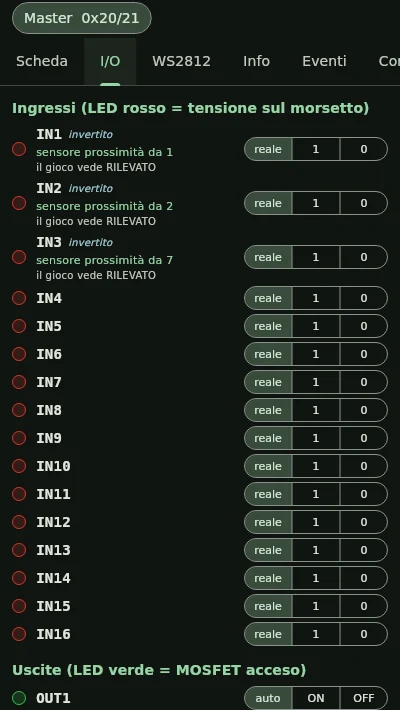
Each board has a virtual twin: inputs, outputs, relays and LED strips light up on screen together with the real LEDs. Every terminal can have a friendly name, so during testing you read "door sensor" and "display case magnet" instead of IN5 and OUT3.
- Inputs, outputs, relays and WS2812 strips in real time
- Channel names next to the labels printed on the board
- Event log and board console
Testing
Test the wiring without the game
From the app you switch every output by hand and simulate every input: the lock clicks, the light turns on, the game sees the sensor as if it had been triggered. You check the whole room before opening it to players, and find the wrong wire straight away.
- Force every output and relay: on, off or automatic
- Simulate inputs to test the game logic
- Back to normal operation with one click
Network and updates
All over the network, without opening the panel
Firmware updates go over the network, one board at a time or all together. From the same window you set the board's address and the game server it connects to.
- Firmware updates over the network (OTA)
- Static IP or DHCP and game server address
- Console and log to understand what happened during a game
From a PC or a tablet
In the browser too, nothing to install
The app runs on a PC in the room and serves the same interface as a web page: from the tablet in your hand while you check the sensors, or from another computer on the same network, just open the browser.
- App for Linux, Windows and macOS
- Same interface in the browser of tablets, phones and PCs on the local network
- Handy in the room: test with the tablet in hand, right in front of the prop
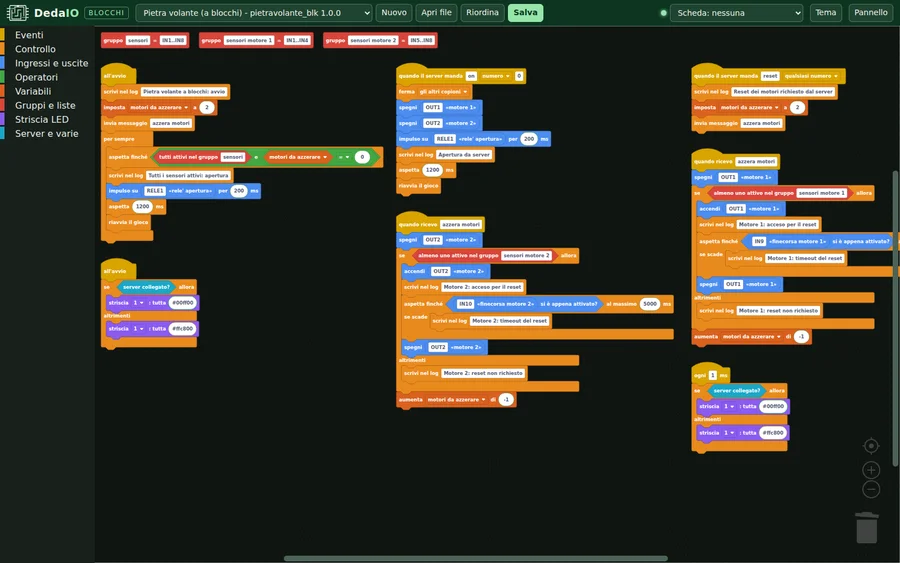
Block programming
Build the game with blocks
A Scratch-style editor, opened in the browser from the app: the game is built by snapping together blocks that use the same names printed on the board, such as IN3, OUT7 and RELE1, with the channels' friendly names alongside.
- Scripts started by events: at startup, when an input triggers, when the game server sends a command, at regular intervals
- Waits such as "wait until…, at most 5 s", with a branch for when time runs out
- Several scripts in parallel, variables, input groups and combinations
- Blocks for LED strips (colours, progress bar) and for the game server
The blocks produce plain C code, the same you would write by hand: no interpreter runs on the board, just the real firmware.
All our existing games have already been rebuilt with blocks: an automated test compares them with the hand-written versions and checks that they respond the same way, output by output.
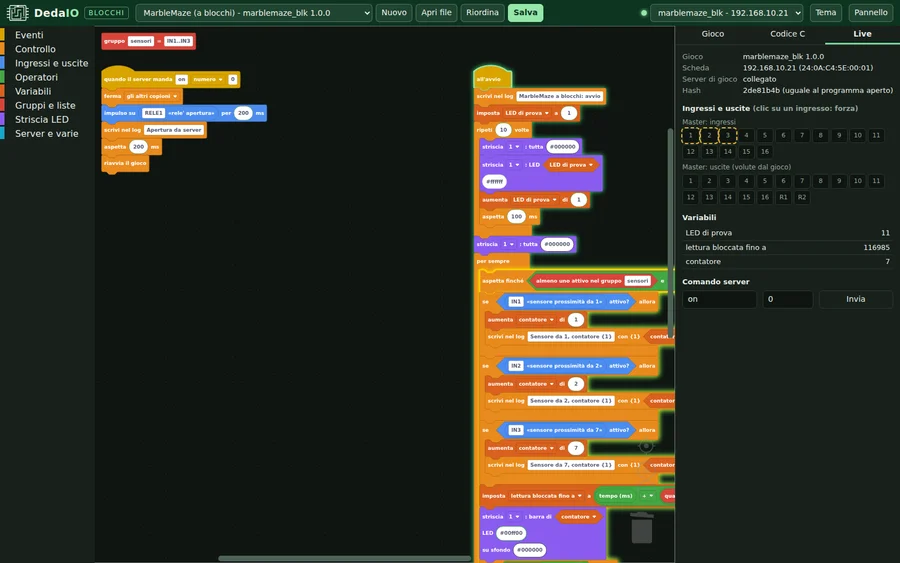
Live view
Watch the program while it runs
Connect the editor to a board and watch the game work, block by block: finding out why a puzzle won't open becomes a matter of seconds.
- The running script lights up green
- The block the game is waiting on lights up yellow
- Executed actions flash and variables update live
- From the same panel you force inputs and simulate game server commands: the prop is tested on its own, without the room software
What's there today
Features and status
| Available | automatic board discovery, live status of inputs, outputs, relays and LED strips, channel names, forcing for testing, firmware updates over the network, network and game server configuration, console and log, browser interface |
|---|---|
| Systems | Linux, Windows and macOS; any browser on the local network |
| Preview | block-based game editor and live program view |
| Not included | running the room: timers, hints, scores and game flow stay with your room software, which talks to the boards over TCP |
FAQ
About the app
Does the DedaIO app run my escape room?
No: the app manages the boards, not the room. It finds, tests, configures and updates them. Timers, hints and running the game stay with your room software or game master, which talks to the boards over TCP.
Do I need to install anything on the tablet?
No. The app runs on a PC in the room and serves the same interface as a web page: from a tablet or another computer on the same network, just open the browser.
Are block-based games available yet?
They are in preview. The block editor generates the game's C code, the same you would write by hand, and the live view shows the program while it runs on the board.
Want to try the app or the blocks?
Write to us: we'll show you the app with a real board and, if you like, let you try the block-based games preview.